Analog Sticks: How They Work, Drift and Replacements
Analog Sticks: How They Work, Drift and Replacements. Understand key specifications, compatibility, drift risks, and practical buying or maintenance tips for.
Analog Sticks: How They Work, Drift and Replacements
Editorial draft • US English • Updated November 2026
Analog sticks translate thumb movement into two-dimensional game controls, usually by measuring horizontal and vertical position. Understanding the difference between the mechanical stick, its position sensor, and the surrounding firmware makes troubleshooting drift or buying replacement parts much easier.
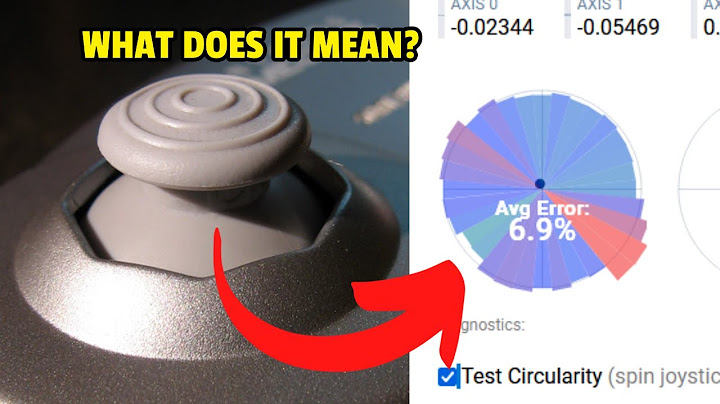
Quick answer: how analog sticks work
The player moves a thumb cap connected to a pivoting mechanism. Two axes report relative displacement from a centered resting point. The controller turns these signals into digital input values that the console or PC interprets as camera movement, steering, menus, or character movement.
Many traditional designs use potentiometers: a sliding contact moves across a resistive element and produces a changing electrical signal. Magnetic Hall Effect and TMR variants sense a magnet without that rubbing sensor contact. Neither approach removes every source of mechanical wear.
Parts of an analog stick assembly
The external thumb cap provides the gripping surface. Under it sit a shaft or gimbal, a spring or centering mechanism, and the sensors that measure horizontal and vertical movement. A clickable L3/R3 switch may be integrated into the assembly. The controller circuit board reads the two analog axes, and firmware applies calibration, dead zones, and processing.
A worn rubber cap, an inaccurate center reading, and a damaged sensor are different problems. Replacing a cap usually changes comfort and grip, not the sensor reading. Replacing an internal joystick assembly is a more invasive repair that may require disassembly, desoldering, soldering, calibration, and electrical troubleshooting.
Why stick drift happens
Drift is unintended reported movement when the player is not moving the stick. Possible causes include worn or contaminated potentiometer contacts, a loose or worn spring, mechanical damage, sensor calibration errors, moisture damage, or controller firmware behavior. Input readings can also change under pressure or after a drop.
Do a basic diagnostic sequence before ordering a replacement: disconnect and reconnect; update firmware where supported; test a different game or input tester; inspect the cap for physical obstruction; and compare idle readings with the stick untouched. Avoid aggressive solvents or spraying liquids into a powered controller.
Potentiometer, Hall Effect, and TMR compared
Traditional potentiometer sensing is established and widely serviceable, but its sliding sensor contact can wear. Hall Effect and TMR designs use noncontact magnetic readings, reducing that specific wear mechanism. Centering springs and physical parts still move, however, and firmware can introduce or correct errors.
Evaluate a complete controller by its return-to-center performance, input resolution under practical settings, dead-zone behavior, latency, repairability, and warranty. A sensor type alone does not establish measured advantage in a particular game.
Replacing a stick: when a cap is not enough
If the cap is split or slippery, a compatible cap replacement might solve the problem. If the game camera moves without input, changing only the cap is unlikely to correct an electronic center-offset error. A complete analog-stick module must match board layout, mounting height, electrical requirements, and calibration expectations.
Console and controller generations may look similar while using different component revisions. Check the exact model number and technician instructions before purchasing parts. If a repair requires soldering or a ribbon-cable removal, consider a qualified repair service rather than a trial-and-error installation.
Practical troubleshooting checklist
First, document which controller and game show the issue. Next, test whether the stick is physically centered. Check in-game dead-zone and sensitivity settings and confirm the problem persists elsewhere. Update supported controller software and retest. Finally, decide whether a cap, cleaning by a professional, calibration, sensor replacement, or a whole controller is the safest response.
Record the symptom before and after a repair. A repair that simply increases the dead zone can mask drift but reduces fine movement; it does not necessarily fix the underlying component.
Related reading
Hall Effect joysticks explained — /topic/hall-effect-joysticks/
Hall Effect controller buying guide — /topic/hall-effect-controller/
TMR joysticks explained — /topic/tmr-joysticks/
Hall Effect PS5 Controllers: Compatibility and Upgrade Options — /topic/hall-effect-ps5-controller/
Controller Thumbsticks: Types, Wear and Replacement Basics — /topic/thumbstick/
DualSense Edge Stick Modules: Replacement and Compatibility — /topic/dualsense-edge-stick-module/
Frequently asked questions
Is a thumbstick the same as an analog stick?
In everyday gaming language they overlap, but thumbstick can mean the outer cap while analog stick can mean the complete mechanism and sensors.
Why does my analog stick move by itself?
Possible reasons include sensor wear or contamination, centering problems, calibration, and software settings; diagnose before replacing parts.
Can I fix drift by increasing dead zones?
A dead zone can mask small unintended readings, but it sacrifices responsiveness and may not repair the physical cause.
Are magnetic analog sticks impossible to wear out?
No. They avoid a sensor contact-wear pathway, but springs, gimbals, wiring, and firmware can still cause problems.
Sources and verification
PlayStation controller troubleshooting — https://www.playstation.com/en-us/support/hardware/accessories/