DualSense Edge Stick Modules: Replacement and Compatibility
DualSense Edge Stick Modules: Replacement and Compatibility. Understand key specifications, compatibility, drift risks, and practical buying or maintenance ti.
DualSense Edge Stick Modules: Replacement and Compatibility
Editorial draft • US English • Updated November 2026
The official DualSense Edge stick module is a replaceable component made for Sony’s DualSense Edge wireless controller. Sony says left and right modules are interchangeable, but the part is not designed for a standard DualSense or unrelated controllers. This guide focuses on compatibility, replacement steps, troubleshooting, and what the module does—and does not—promise.
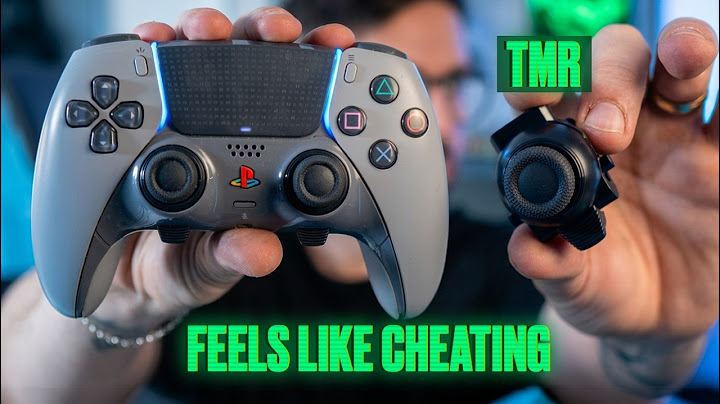
Quick answer: what the official module replaces
A DualSense Edge stick module is an internal, removable stick mechanism; it is not merely a thumb cap. Sony sells it separately so an Edge owner can swap a malfunctioning module without the usual soldered-stick repair process. The official replacement part is intended for the DualSense Edge wireless controller only.
Sony identifies the official part as CFI-ZSM1 on its product listing and states the left and right positions are interchangeable. This does not mean every third-party stick cartridge or a Hall Effect/TMR replacement is supported by Sony. Check the vendor and exact product identity before buying.
Compatibility: Edge versus standard DualSense
The original DualSense and the DualSense Edge are different controllers. The Edge has a manufacturer-designed removable module system; a standard DualSense does not use this same official cartridge. Avoid listings that claim a single official stick module fits both without explaining a distinct modification process.
Replacement caps, stick modules, and aftermarket board modifications are separate products. Before placing an order, confirm that your controller is specifically a DualSense Edge and that the package contains one complete replacement stick module, not merely a cap.
How to replace a DualSense Edge stick module
Follow Sony’s published process rather than prying the shell. Turn off the controller so its player indicator is off and disconnect the USB cable. Slide the RELEASE latch on the back to take off the front cover, then raise the module release lever. Carefully slide the old module out.
Align the new module with the grooves and insert until it clicks, lower the release lever, then replace the front cover until it is securely seated. Sony instructs users not to touch connectors and to discharge static by touching a nearby grounded metal object first. Keep small parts away from children.
After the swap, reconnect and test movement in a safe game or controller settings screen. If the controller still behaves incorrectly, recheck seating and follow PlayStation support guidance rather than forcing the module or connectors.
Does replacing the module solve drift?
A new module may help when a worn or malfunctioning stick module is causing erratic readings. It is not a guarantee that every input issue originates in that module. Firmware, settings, the controller’s other electronics, and mechanical damage can also create symptoms.
Before buying, try the manufacturer’s recommended troubleshooting steps: document which side drifts; compare the issue across games; inspect the controller physically; update supported software; and test input behavior. Keep proof of purchase for warranty or return requests.
Official modules and magnetic-stick claims
Sony’s official replacement module should not be advertised as a Hall Effect or TMR upgrade without evidence. Some third-party projects may discuss magnetic conversions, but do not treat those as official Sony compatibility claims or guarantee they share the same warranty and user-install process.
Sensor technology is separate from the Edge’s removable-cartridge feature. A replaceable potentiometer-based module and a modified magnetic module serve different goals. Choose the option with verified fit, dependable support, and clear installation documentation.
Buying and care checklist
Confirm your controller model and exact module part number, seller authenticity, return and warranty conditions, and whether the listing contains a single module or multiple accessories. Check the current official availability in your region instead of relying on old price screenshots.
Store unused modules dry and protected from dust. Follow Sony’s handling directions; do not force a misaligned connector, disassemble the cartridge without appropriate expertise, or use solvents around contacts.
Related reading
Hall Effect joysticks explained — /topic/hall-effect-joysticks/
Hall Effect controller buying guide — /topic/hall-effect-controller/
TMR joysticks explained — /topic/tmr-joysticks/
Hall Effect PS5 Controllers: Compatibility and Upgrade Options — /topic/hall-effect-ps5-controller/
Analog Sticks: How They Work, Drift and Replacements — /topic/analog-sticks/
Controller Thumbsticks: Types, Wear and Replacement Basics — /topic/thumbstick/
Frequently asked questions
Does the official DualSense Edge stick module fit a normal DualSense?
No. Sony markets the official replacement for the DualSense Edge wireless controller only.
Can I put the left module on the right side?
Yes. Sony states the left and right Edge stick modules are interchangeable.
Is the official replacement a Hall Effect module?
Sony does not market its standard replacement module as a Hall Effect upgrade; do not make that assumption based only on removability.
What should I do if the new module does not work?
Power down, verify correct seating and cover reassembly, then consult official troubleshooting or warranty support without forcing the hardware.
Sources and verification
Sony: replace a DualSense Edge stick module — https://www.playstation.com/en-us/support/hardware/edge-replace-stick/
Sony: official DualSense Edge stick module product — https://direct.playstation.com/en-gb/buy-accessories/stick-module-for-dualsense-edge-wireless-controller
Sony: DualSense Edge instruction manual — https://www.playstation.com/content/dam/global_pdc/en/corporate/support/manuals/accessories/ps5-accessories/dualsense-wireless-controller-edge/CFI-ZCP1_PS5_Wireless_Controller_Instruction_Manual%24en.pdf