How to Remove a Ring Video Doorbell Safely
Ring doorbell faceplate and bracket removal for verified owners. Practical US-English guide with sourced details and clear limitations.
How to Remove a Ring Video Doorbell Safely
Information checked: November 1, 2026
To remove a Ring video doorbell safely, first identify the exact model. Some use one or more security screws at the bottom of a faceplate; newer battery models may release from a bracket with a dedicated tool. A hardwired device also involves an electrical connection, so shut off power at the circuit breaker before working on its wiring. There is no single universal removal motion that is safe for every Ring doorbell.
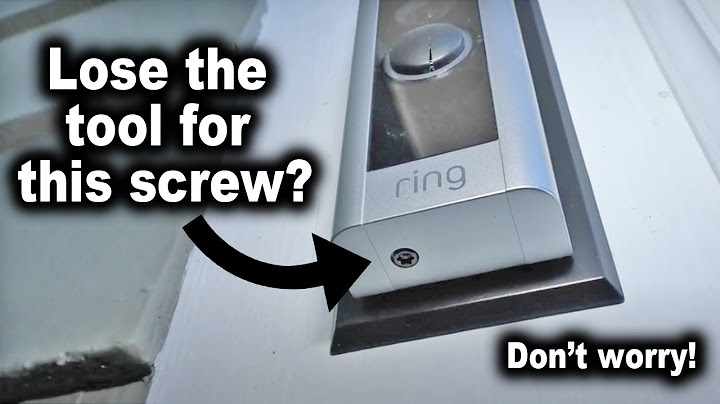
Identify the model and purpose
Check the device listing in the Ring app, the original packaging or the label where accessible. Are you removing the front cover to recharge a removable battery, taking the device off its mount to charge a built-in battery, or permanently relocating it? Those are different operations. Ring's model-specific instructions show both security-screw arrangements and release-tool arrangements. Do not insert a random sharp object into a seam or force a plastic latch that does not release normally.
Battery-powered doorbells
For models that use bottom security screws, support the device while carefully loosening the supplied screws with the correct Ring tool. Follow the model's instructions to lift the doorbell off the bracket. Other models use a dedicated removal tool at a release slot. The goal is to release the designed lock, not pry between the wall and device. Charge only with suitable equipment and reinstall fully so the unit cannot slip off during normal use.
Hardwired models and electrical safety
Turn off the relevant circuit breaker and verify power is off before disconnecting existing doorbell wiring. If you cannot identify the circuit or are uncomfortable working near electrical terminals, use a licensed electrician. Keep wires protected and follow local electrical rules. Do not pull on a camera while its wires are still attached. Photograph the arrangement only if doing so can be done safely and will help with reinstallation.
Moving, selling or resetting the doorbell
Physical removal does not necessarily remove a device from an account. Ring distinguishes deactivation, which can preserve historical events under certain subscription conditions, from deletion, which may remove access to event history. If you are handing the device to another person, follow the official ownership-transfer and account instructions. Download important permitted recordings before making irreversible account changes.
Removal checklist
Confirm exact Ring model and release mechanism.
Use the supplied tool and avoid prying.
Cut power at the breaker for any wired disconnection.
Check account deactivation and footage consequences separately.
Frequently asked questions
Do all Ring doorbells have a security screw?
No. The release design differs by model, and some use a dedicated removal tool.
Should I turn off the breaker?
Yes, before disconnecting hardwired doorbell wiring. Get professional help if uncertain.
Does removing the doorbell delete video?
No. Physical removal and cloud-account deletion are different; video access depends on account and subscription status.
Related reading
For a focused follow-up, see Ring Home Security System Explained; Ring Outdoor Wireless Cameras.