Catit PIXI Smart Feeder: Kibble Schedule and Specs
Understand the Catit PIXI dry-food smart feeder and how it differs from the PIXI 6-Meal wet-food-compatible model.
Catit PIXI Smart Feeder: Kibble Schedule and Specs
The Catit PIXI Smart Feeder is the app-controlled dry-kibble hopper in the PIXI lineup. It should not be confused with the PIXI Smart 6-Meal Feeder, a rotating tray that can hold prepared wet-food servings. If you are comparing seller pages, matching the model identifier and food compatibility first will prevent most mistaken purchases. This overview uses Catit's published specifications; it is not a hands-on performance review.
Identify the correct model
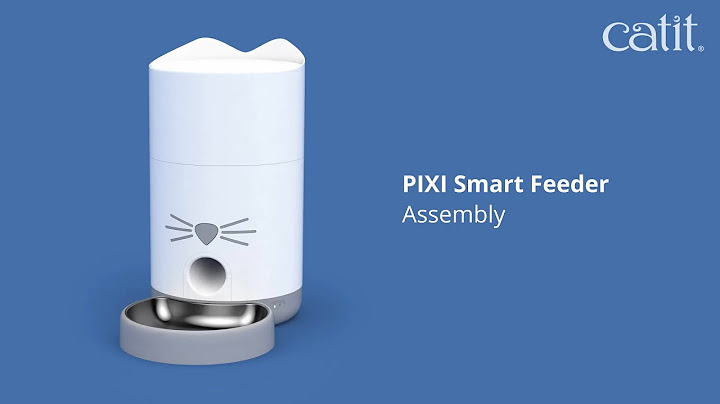
Catit identifies this dry-food model as PIXI Smart Feeder number 43752. It has a vertical reservoir and dispenses dry food through a feed mechanism into a bowl. The manufacturer's published reservoir capacity is approximately 2.9 liters or 1.2 kilograms, depending on kibble density. The machine's purpose is to schedule small amounts of compatible kibble, not to preserve canned food. Products with the PIXI name may look similar in marketplace search results, so check the exact number before reading ratings or reviews. A camera-equipped PIXI Vision model is also separate and should not be assumed to share every feature.
Reservoir and dry-food compatibility
Catit's specifications state that this feeder accommodates kibble no larger than approximately 9 mm and includes a stainless-steel dish. A manufacturer's capacity estimate depends on the food's shape and density, so measure how much your own bag fills the hopper rather than assuming it holds a fixed number of meals. Oversized or irregular pellets may lodge in the outlet. Never use wet food, soft treats or sticky pieces in a dry-only reservoir. Before making an automatic schedule, dispense several small test servings and weigh the amount delivered; the app's portion setting is not the same as a vet-approved calorie target.
Scheduling, connectivity and power fallback
The official page lists up to 12 programmable meals per day, app alerts and a 2.4 GHz Wi-Fi connection. Catit also describes four C/LR14 batteries as backup power, with an estimated backup duration under specified conditions. Do not translate an estimate into a guarantee during every outage. Set up the schedule on mains power, then test behavior when connectivity is interrupted while you are home and the cat has an alternative meal. Pay attention to whether the motor still dispenses, whether alerts arrive later and how the unit handles a low reservoir. A feeder that releases food does not confirm which cat consumed it.
Hygiene, seals and bowl cleaning
The manufacturer's listing mentions a reservoir sealing ring and a desiccant pack intended to help keep kibble fresh. Neither replaces safe dry-food storage. Follow the manual when cleaning the hopper, and dry every part completely before refilling. Retain the original kibble packaging for the lot number and best-by date. Clean the dish after use, check the outlet for accumulated powder and replace desiccant only according to official instructions. If a pet pushes the unit or paws at the dispensing chute, choose a stable location and examine the feeder for stress or damage. Avoid putting the electronic base in water.
Key differences from 6-Meal PIXI
The PIXI Smart 6-Meal model uses a tray with six prepared servings and includes ice packs; the PIXI Smart Feeder discussed here uses a dry-kibble reservoir. The 6-Meal listing mentions both wet and dry food, whereas model 43752 has a defined kibble size limit. Buying the wrong model can lead to incorrect expectations about freshness, cleaning and portion capacity. Neither should be called a complete 'pet sitter.' Monitor the cat, bowl and equipment daily. If you need food access restricted to one cat, a microchip feeder solves a different problem from this timer-based dispenser.
What to confirm in the latest manual
Before purchase, confirm model 43752, the latest manual, supported region and warranty, current app requirements and compatible kibble diameter. Inspect whether the bowl height is comfortable and how safely the power cord can be routed. Check the cleaning schedule and availability of consumables. Ask whether local scheduling continues if Wi-Fi drops in your exact firmware version rather than assuming every smart feeder has offline operation. A straightforward dry-only routine with manual checks is more useful than an advanced app configuration you cannot reliably maintain.
Frequently asked questions
Is Catit PIXI Smart Feeder for wet food?
No. This hopper-style model is specified for compatible dry kibble; the PIXI 6-Meal tray is a different product.
What kibble size works?
Catit lists dry food of up to about 9 mm; confirm the current manual before purchase.
Does it use Wi-Fi?
The manufacturer lists 2.4 GHz Wi-Fi for app scheduling and alerts.
How many times can it feed daily?
The published specifications describe up to 12 meals per day; actual portion size should be measured with your kibble.
Related guides
Read: Automatic Cat Feeders: A Practical Buying and Setup Guide
Read: Catit PIXI Smart 6-Meal Feeder: Model Overview
Read: Cat Feeding Schedule: Planning Meals Without Overfeeding