WOPET Automatic Pet Feeder: Specifications to Verify
Find out how to identify WOPET feeder models and compare current schedules, portions, connectivity and cleaning instructions.
WOPET Automatic Pet Feeder: Specifications to Verify
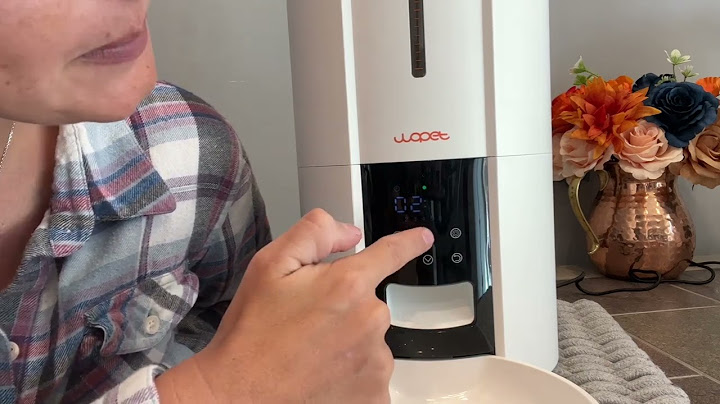
WOPET sells multiple automatic pet feeders, so searching for 'WOPET automatic pet feeder' does not identify one specification sheet. Some models use local timers; others offer Wi-Fi apps, cameras or two bowls. A useful comparison begins by finding the model code on the box or listing. This guide explains which specifications to check and uses the F07 Pro as an illustration, not a claim that all WOPET feeders perform alike.
Why model number matters
WOPET's support center lists several distinct feeder families, including the Patrol F07 Pro, Cube Air, Heritage models, camera-equipped versions and dual-bowl designs. Features can differ even within a similarly named product line. A listing that says '6L Wi-Fi feeder' may not tell you the app name, supported Wi-Fi band or portion mechanism. Look for a model number in the product title, manufacturer's specifications or downloadable manual. If the seller does not identify a model, do not assume it has a battery backup, camera or offline scheduling. Compare like with like: capacity, dispense mechanism, bowl count and support documents should all refer to the exact same unit.
Food compatibility and serving calibration
Check that the feeder is designed for the food you use and that your kibble size is within the specified range. For example, the official F07 Pro description identifies compatible kibble in the approximately 5–15 mm range, while other WOPET models have their own specifications. Do not assume the same figure applies to the whole brand. To establish portion accuracy, weigh repeated manual releases using your actual kibble. Food size, shape and density can affect what a 'portion' means. A dual-bowl splitter also may not divide food evenly; test both dishes before relying on it for two cats. A product's hopper capacity does not replace calorie planning.
Wi-Fi versus local scheduling
Some WOPET products have app control; others use controls on the device. The F07 Pro manufacturer page, for example, describes 2.4 GHz Wi-Fi and the WOpet Life app, while other lines can support different wireless options. Ask whether stored local schedules keep running after the network disappears and whether changes made remotely require the feeder to be online. If a model includes a camera, check the app's viewing permissions and the location of recordings. A feeder should be simple for other household members to operate when the main account owner is unavailable. Do not presume that every WOPET model uses the same app or firmware.
Battery backup and monitoring
Backup behavior is one of the most important purchase checks. WOPET states that the F07 Pro can run scheduled feedings from three D batteries when mains power fails, while its Wi-Fi/app features require external power. Another model may behave differently. Review the exact manual and conduct a safe test while at home: disconnect the adapter, observe a scheduled release and confirm the cat has access to water and an alternative meal if it fails. An app showing an old schedule is not proof the motor still works. Low battery alerts, clock drift and outlet jams all deserve attention before you rely on a machine during an absence.
Bowl hygiene and kibble storage
Kibble dust and fat residues collect inside hoppers and near rotating mechanisms. Follow the exact cleaning instructions, remove food before disassembly and dry all parts completely before refilling. Keep the original food bag for traceability, and protect the feeder from humidity, direct heat and pets that try to pry open the lid. Wash food bowls after use. Be cautious with detachable splitters and exposed cords around active cats. If the rotor begins making an unusual noise or portions stop dispensing, pause the automatic schedule and troubleshoot with the correct manual rather than repeatedly pressing the feed button while the unit is jammed.
Official model document checks
Before buying, save the model number, manual URL, seller warranty, return policy and the current app name. Verify kibble range, bowl configuration, Wi-Fi band, power requirements and what exactly continues under battery operation. For a dual-bowl feeder, test whether both pets actually receive the planned amounts without guarding. For a camera model, read privacy settings and any storage subscription terms. Prefer a documented model with accessible spare parts over a poorly identified listing claiming every feature. This is a buyer's specification checklist, not a durability ranking or a claim that a particular WOPET model was independently tested here.
Frequently asked questions
Are all WOPET automatic feeders Wi-Fi enabled?
No. WOPET sells multiple models with differing controls and connectivity. Match the model number.
Does WOPET work during a power outage?
Some models provide battery-backed feeding, but what continues to operate depends on the exact unit.
Can WOPET feeders serve wet food?
Many hopper models are dry-food-only. Check food compatibility in the model manual.
How do I compare WOPET portion sizes?
Weigh several dispensing cycles using your own kibble; do not compare settings across different models as if they were standardized.
Related guides
Read: Automatic Cat Feeders: A Practical Buying and Setup Guide
Read: Cat Feeding Schedule: Planning Meals Without Overfeeding